FAQs - Discussions
Q1: I wish to opt out of the discussion threads related to the Package 1 and be part of Package 2 only. Please share the steps to achieve the same.
A:If your aim is just to be free from the notifications of discussions, you can enable the "Participated" option from Notification Settings. To do this, navigate to Menu > Portal Settings > Notification Settings.
If you wish to completely exclude yourself from discussions related to a specific package, follow these steps to disable the "Collaborate" permission in the Access Permissions menu:
1. Select the repository and navigate to Menu->Access Permissions.
2. Select the respective package, click on the drop-down to select User/Group, make sure to disable the Collaborate option, and then click on Add.
Kindly be aware that to apply the new permissions, you must first remove the current permissions assigned to a group. Also, if the Collaborate option is disabled, it will affect all members of that group, restricting their ability to discuss within that specific package.
Reference
Ticket ID: #6916
Subject: Unsubscribing from Prolaborate discussions
Department: Sparx Platform Support
Q2:Where can I configure the email address to send the notifications to if the Prolaborate Admin(admin@prolaborate.com) email address is not recognized by the Outlook server?
A:The user issue is notification emails being sent to an email address (admin@prolaborate.com) that is not recognized by their SMTP mail server.
To resolve this issue, we recommend adjusting the notification settings to only send emails to participants directly involved in the discussion.
By selecting the "Participated" option in the menu -> notification settings, emails will only be sent to tagged users actively engaged in the discussion, rather than sending notifications to additional email addresses, such as admin@prolaborate.com, which might not be valid in your mail server.
For more information about notification settings please refer to the documentation here.
Reference:
Ticket ID: #10168
Subject: Prolaborate Admin email not known FW: New reply on "PROL10"
Department: Sparx Platform Support
Q3: Replies in a discussion often have different sequence numbers?
Description
When a discussion is created, the email notification indicates SEB1 SEB2, but when someone replies to the discussion created, the count increments to SEB4, and SEB 5 based on the new replies. However, when the user clicks on, for SEB16 discussion in the notification, it opens discussion SEB13. Can you please verify whether this is a bug or not?
Solution
This is a bug in Prolaborate V5.0.0 and we have created a bug ticket it will be resolved in future release.
Bug Ticket
Ticket ID: #7830
Subject: [Bug]- Discussion Count Mismatch in Prolaborate
Department: Prolaborate Support
URL: https://desk.zoho.com/agent/sixthforcesolutions/prolaborate-support/tickets/details/759413000028872001
Subject: [Bug]- Discussion Count Mismatch in Prolaborate
Department: Prolaborate Support
URL: https://desk.zoho.com/agent/sixthforcesolutions/prolaborate-support/tickets/details/759413000028872001
Reference
Ticket ID: #7746
Subject: Discussion points
Department: Prolaborate Support
URL: https://desk.zoho.com/agent/sixthforcesolutions/prolaborate-support/tickets/details/759413000028327829
Subject: Discussion points
Department: Prolaborate Support
URL: https://desk.zoho.com/agent/sixthforcesolutions/prolaborate-support/tickets/details/759413000028327829
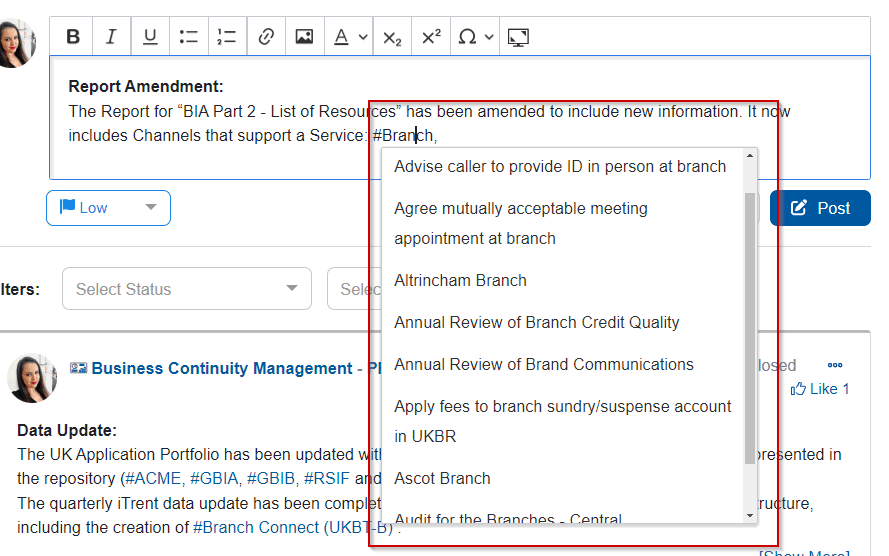
Q4:The hashtag functionality in discussions within Prolaborate is unable to display more than 10 elements
Answer
As of now in version 5.3, we can only search for 10 elements using the tag functionality. However, this feature will be added in an upcoming version of Prolaborate.
Reference
Ticket ID: #11311
Subject: Using hashtags in discussions
Department: Prolaborate Support
Tags
reviews,
admin account email not configured in,
participated,
opt out of discussions,
edit review status,
prolaborate admin receiving,
unsubscribe from discussions,
discussion related faqs,
UniqueID mismatch,
bug,
hashtags,
Limitation,
Elements searching.
participated,
opt out of discussions,
edit review status,
prolaborate admin receiving,
unsubscribe from discussions,
discussion related faqs,
UniqueID mismatch,
bug,
hashtags,
Limitation,
Elements searching.
Related Articles
FAQs - Reviews
Q1: If a user leaves the organisation and his account is deleted from the environment, who all can change the review status in the Prolaborate environment? Answer As of now, a super admin who is not part of the review can change the status and even ...Known Issue - Admin Account locked
Description Customer reported that the admin account has been locked and can’t perform any action. Possible Reason: It may be occurring after 3 times for Wrong password or username in Prolaborate. Also, this is a temporary lockout, and the account ...FAQs – Export Reviews as Report
Description: Ryan reported FedEx and some of the other SSNA customers are requesting for the feature to Export to Reviews and their discussions as a report. This feature was available in ProlaborateV3 but not in the latest versions of V4. Prolaborate ...FAQs - Prolaborate Installation
Q1:Can you suggest how we may configure Prolaborate using https and port 443. Do you have any links to documentation? Answer You can configure the Protocol and Port settings from Prolaborate Management typically located in C:\Program ...Troubleshooting - Discussions
Q1 How to fetch all discussions of the repository via Database Description A customer requested to fetch all the discussions of the repository in Prolaborate. Note The feature to view all discussions by Admin will be available in the upcoming ...