Known Issues - Jama Integration
Pick List Items are missing in EA thick client
Description
Picklist values are missing in EA thick client. When accessing from EA, the system integration reads picklist information as an empty string.
Picklist in Jama

Picklist in Enterprise Architect

Steps to Reproduce

1. Created a requirement in Jama with a pick list field.

2. When viewing from an EA thick client, it will show asterisk values instead of the actual pick list.
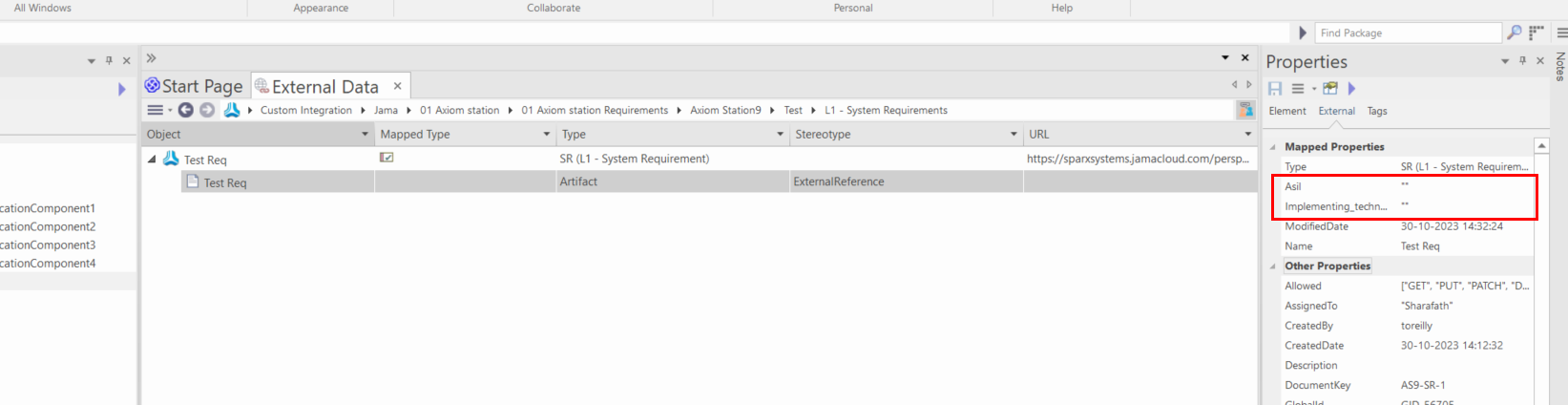
This issue can be reproduced in PCS (5.1.128 or older versions).
Possible Reason

The Jama dev team confirmed that PickList is not supported currently, and HQ will implement this in a future release of Pro Cloud Server
Workaround

There is a workaround to add the PickList items as tagged values in EA.
1. Click on the menu drop-down icon and select Configure.

2. Click on Configure Field Mapping.

3. Select the External type and External Field.


4. In Maps to fields, select Tagged value and type in a name for your tagged value.


5. Click Save
Once you've done this, you have to create a new local element so that the tagged value is updated in your local Jama element.

Email Response
[Initial email to be rolled out]

Hi Team,
Thank you for your patience and understanding.
We would like to inform you that the type PickList is not currently supported. Our Internal Team has verified that this feature will be included in the future build of Jama Integration. We will keep you posted on any updates regarding this.
If you have any questions or need assistance regarding this, please let us know.
[This workaround can be shared if the customer is looking to add the PickList as a tagged value in EA]
Hi <Customer>,
Thank you for your response.
We have checked this with our team. Currently, it is possible to configure Jama properties as tagged values by following the steps outlined below,
<WORKAROUND>
If this doesn't address your specific needs, please provide more details about your request, so that we can assist you accordingly. Kindly review this information and let us know if you have any questions or need assistance.
Reference
Related Articles
Known Issues - Migration
Q1: "Invalid License" or "License Missing" error after migrating Prolaborate to a new server Description The Prolaborate and Pro Cloud Server is migrated to a new Server setup. After logging into Prolaborate, an error message appears saying "Invalid ...Known Issues - Attributes
Q1: Tagged Values not displayed in Color Configuration page Description The color configuration for a custom MDG is not displaying all the tagged values from the stereotypes. The customer is using Prolaborate V4.4.1.33. Steps Taken - The issue can be ...Known Issues - Adding Elements in Prolaborate
Q1. Adding a new element with Custom Properties does not include the Properties in EA Description The elements added in Prolaborate have custom properties in them, but they are not included as a tagged value in the model when viewing from Enterprise ...Known Issues - Charts
Q1: Roadmap Displaying EA GUID Values When Grouping by RefGUID Property Description The customer reports that when grouping the roadmap items by a property of type 'RefGUID', the roadmap shows the EA GUID values of the referenced elements. We were ...Known Issues - Dashboard
Filter option unavaliable for all columns Description The customer reported in v3 that we have every column in report widget have filter option but in v4 only one filter option for all tables. Possible Reason This is a feature in v3 but it was ...