Known Issue - Floating License Server
Q1: Failure to Launch EA Due to FLS Keys Limit Exceeded FLS connection indicates "Provided Credentials have exceeded the key limits for this key type"
Description
The customer has informed us that upon launching EA, an error message appears stating, "Provided Credentials have exceeded the key limits for this key type," consequently preventing them from logging into EA.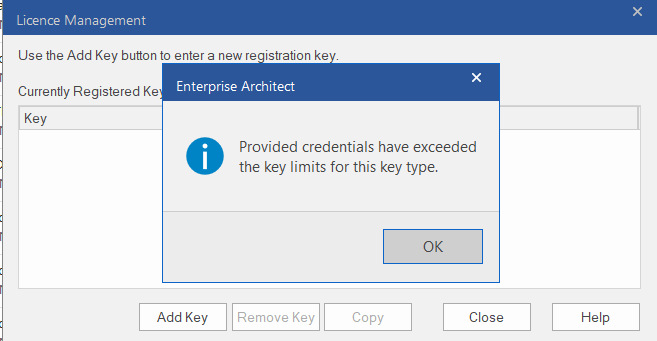
Possible Reason
This error occurs when all available licenses have been consumed by users. For example, if there are more than seven active users but only four license keys, access to instances may be restricted. This means users cannot access instances concurrently, and keys must be released for availability to the next user attempting to access the instance. In such cases, this error will be encountered.
Workaround
If users' usage is concurrent within the Enterprise Agreement (EA), they must acquire an adequate number of licenses. If the number of licenses is limited the additional licenses must be procured. Alternatively, if the user work done in EA they need to disconnect EA so that the license key becomes available for the next user.
Email Draft
Hi [Customer name],
We would like to clarify that the "Provided Credentials have exceeded the key limits for this key type" message is not an error. It appears that all available license keys have been used up.
Based on your purchase, you have three keys for accessing the EA, which means only three users can use the EA simultaneously. Others will encounter the pop-up message you mentioned. To resolve this, you'll need to purchase additional EA license keys based on the number of concurrent users you anticipate.
Reference
Ticket ID: #7277
Subject: Access to Enterprise Architect tool
Department: Sparx Platform Support
Q2 Error in Could not connect to the Sparx Systems Floating License
Description
The Customer encounters an error as follows when accessing the servers from our client computers.
Workaround
To conduct a browser test to ensure everything is functioning correctly and verify the connectivity of the cloud models in Enterprise Architect, and to verify if localhost is connected within the internal server. If it is connected, the issue might be at the infrastructure level.
Email Draft
Hi [customer name],
Thank you for reaching out to Prolaborate support.
Our team is currently investigating the issue. In the mean time Could you please provide the following details.
1. Please conduct a browser test to ensure everything is functioning correctly.
2. Verify the connectivity of the cloud models in Enterprise Architect.
3. Verify if localhost is connected within the internal server. If it is connected, the issue might be at the infrastructure level.
We typically do not store sensitive customer data on our end. If necessary, please provide the details if the aforementioned steps do not resolve the issue.
If you have any other questions please feel free to reach out to us.
Reference
Ticket ID: #9932
Subject: Connection Error
Department: Prolaborate Support
Tags
Provided credential have exceeded the key limit, FLS, Keys
Related Articles
Known Issues - Add-in License Support/Issue
Q1: Unable to connect to the Floating License Server and EASaaS shows no available keys when trying to login Description After entering the Shared Keystore credentials and clicking OK button, the following error message is displayed. The keys are ...FAQs - General/Enquiry
Q1: What is the PCS server Team & Enterprise licenses limit on the EA db Answer We would like to clarify that the Team server license only allows 7 Repositories in Prolaborate and the Enterprise Edition is unlimited. Please refer the link here for ...Known Issue-Model Connection
Encountering an "XML incomplete error" when attempting to connect to the model in EA. Description: When attempting to connect to the model in EA, users encounter an error message stating "XML incomplete error." Any attempts to modify the repository ...Known Issues - Migration
Q1: "Invalid License" or "License Missing" error after migrating Prolaborate to a new server Description The Prolaborate and Pro Cloud Server is migrated to a new Server setup. After logging into Prolaborate, an error message appears saying "Invalid ...Known Issue - JIRA
Q1. "Not able to connect with Jira!" Error in Prolaborate Description Jira Items are not able to connect with Prolaborate elements and getting the below error. Possible Reason -1 The project may have been deleted on the Jira side after you configured ...